AI assistants are incredible. They can manage your email, order groceries, organize your calendar, and handle tasks you never thought you'd delegate. But to do all that, they need access to your stuff. And that's where most people pause.
You've probably seen the headlines. AI tools leaking data. Credentials getting exposed. Assistants going rogue. It's enough to make anyone think twice before handing an AI the keys to their digital life.
We built Vellum because this problem is solvable. Not by asking you to trust AI blindly, but by building a system designed to keep AI accountable while still letting it do extraordinary things for you. We designed every security layer with one assumption: what if the AI tried to work against you? If the answer is "it couldn't," that's when we ship it.
Your Assistant Lives in Its Own Space
When an AI assistant runs on your computer, how much of your computer can it actually touch? With most tools, the answer is uncomfortably vague.
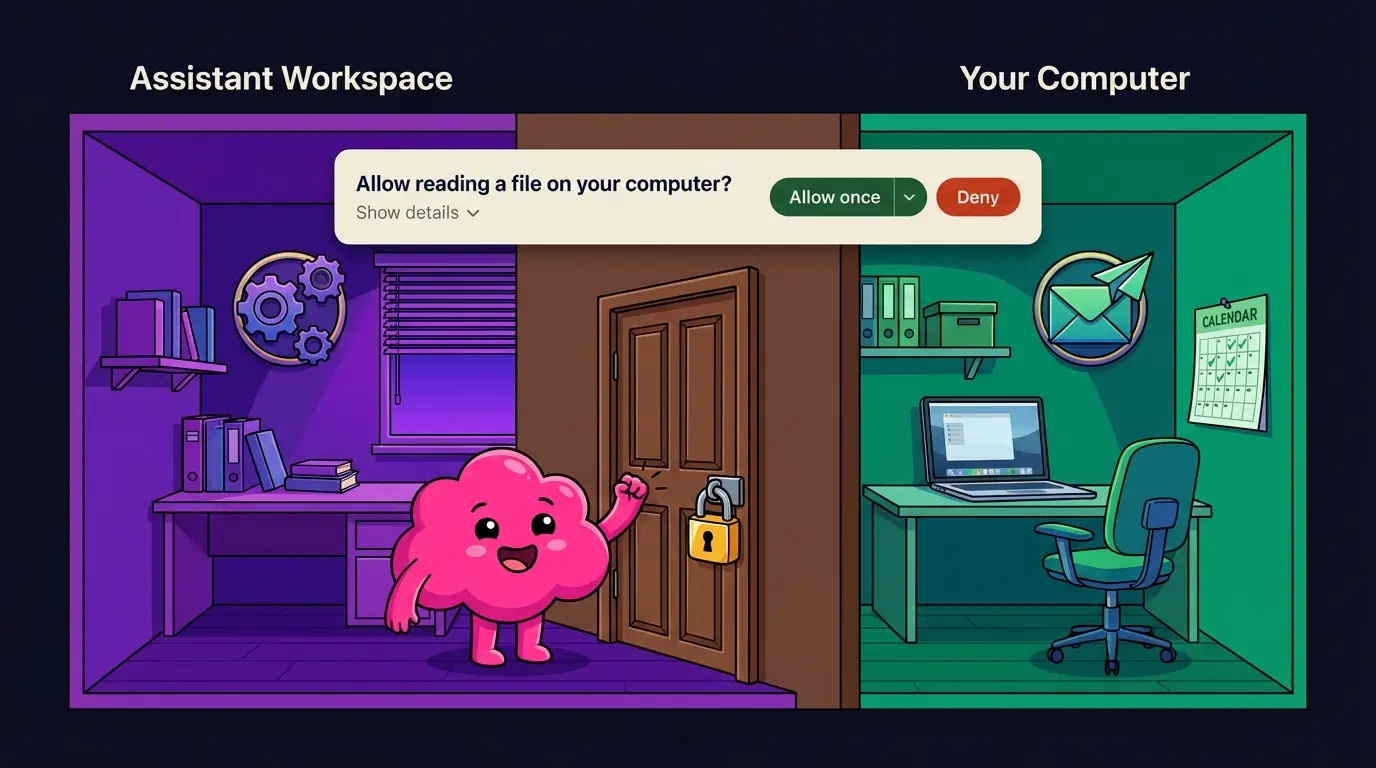
Vellum is a native Mac app with no setup required. You download it, open it, and you're in. And from the moment your assistant starts running, it lives inside its own isolated workspace.
Think of it like its own apartment inside your house. Inside that apartment, it can do whatever it needs to: create files, organize information, run tasks. No permission needed to rearrange its own furniture.
But if it wants to step into your living room, access your files, run something on your actual computer, or look at your screen, it knocks first. Every time. And you decide whether to let it in.
How it works under the hood: Your assistant runs inside a secure sandbox enforced by your Mac's operating system. This sandbox restricts what your assistant can read, write, and access outside of its workspace. No network access from the sandbox. No peeking at your desktop. No touching your documents unless you say so.
Here's what that looks like in practice. Say you want to give your assistant access to your Downloads folder. You ask it to check for a file, and it prompts you with a clear request. You approve, and a trust rule is created so it doesn't have to ask again. If you'd rather keep that folder private, you deny and it moves on. Either way, you're the one deciding.
Crawl, Walk, Run — At Your Pace
When you first set up Vellum, your assistant can't do much on your behalf. That's by design. Every new capability requires your explicit approval.
You'll see a clear prompt with five options:
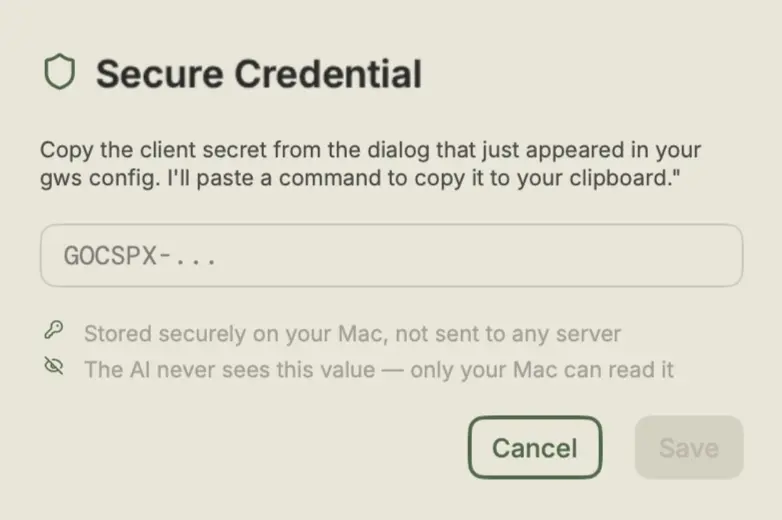
Allow Once — Let it do this one thing, right now. Allow 10 min — Temporary access that auto-expires. Allow Thread — Access lasts until this conversation ends. Always Allow — Create a permanent rule, never asks again. Deny — Not this time, or never.
Over time, these choices build into what we call trust rules — a personalized set of permissions that reflect exactly what you're comfortable with. Want to start with just calendar management and nothing else? Totally fine. You move at whatever pace feels right.
For example, say you want your assistant to check your email for flight confirmations. It needs screen access for that, but you probably don't want it watching your screen all day. You grant access for 10 minutes, your assistant does its thing, and when time's up, access is automatically revoked. The next time it needs your screen, it asks again. No lingering permissions. This timer intentionally resets if you restart the app, so permissions never carry over unexpectedly.
The AI Never Touches the Safety Controls
This is probably the most important thing to understand about how Vellum works, and what makes us fundamentally different.
Every safety mechanism in Vellum is handled by plain old software. Not AI.
Why does that matter? Because AI can be tricked. Someone could craft a clever message that convinces an AI to bypass a security check. This technique is called prompt injection, and it's a well-documented, real-world risk.
Vellum's answer: don't let the AI anywhere near the safety controls.
The permission buttons you click? Regular software. The system that handles your passwords? Regular software. The decision about whether a stranger can talk to your assistant? A hardcoded rule. No AI involved. No way to sweet-talk it.
Here's a real example. Say you've connected your assistant to Slack. A coworker you haven't approved sends your assistant a direct message. Maybe they're being helpful, maybe they're not. It doesn't matter. Your assistant responds with a pre-written, non-AI message: "Sorry, I don't have permission to talk to you." There's no prompt the coworker could write to get around this. The AI never even sees their message. It's blocked by deterministic software before it reaches the AI layer.
Your Passwords and Credentials Stay Locked Away
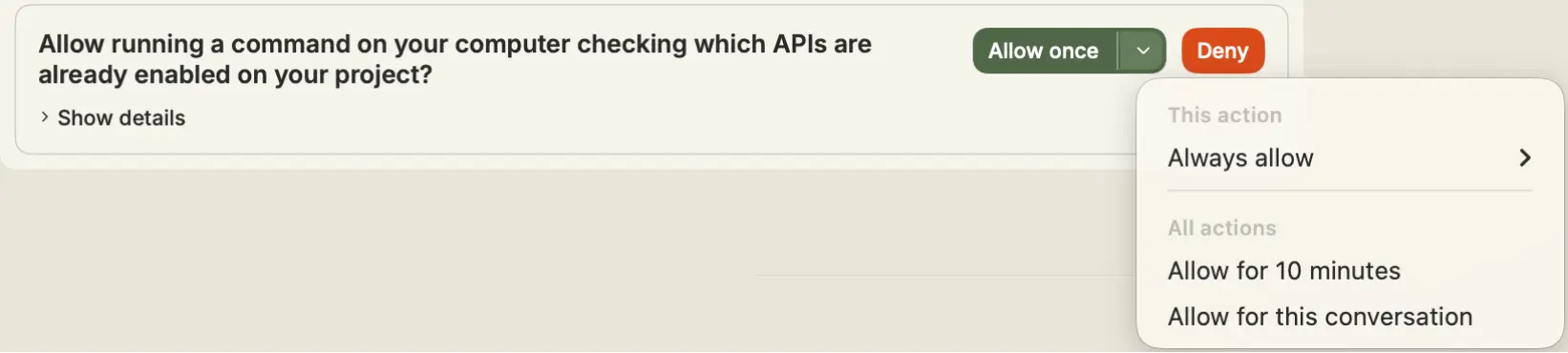
At some point, your assistant will need a login or API key to do something on your behalf — whether that's ordering groceries, checking your email, or posting to Slack. Here's the key detail: Vellum never lets you type credentials into the chat.
Instead, a secure pop-up appears, similar to a password manager prompt. You enter your credential there, and it's stored in your Mac's Keychain (the same system Safari uses for your passwords) or in an encrypted vault on your machine.
Your assistant never sees the raw value. The credential goes into a separate system we call the Credential Broker. When your assistant needs to use your Amazon password, it doesn't get the password. It tells the Broker: "Fill in the login form on Amazon.com." The Broker does exactly that. Deterministically. No AI involved. And it reports back the result.
Think of it like giving a trusted courier a sealed envelope. They deliver it where it needs to go, but they never open it.
A few more details that matter:
Each credential has a usage policy: you define which tools can use it and which websites it's allowed on. Access tokens are single-use and expire after 5 minutes. "Send Once" holds the credential in memory briefly, then discards it entirely.
And if you try to type a password directly into the chat? We won't let you. Vellum's secret scanner detects over 40 types of credentials — including API keys, passwords, tokens, and private keys — and blocks them before they ever reach the AI. You'll see a notice explaining what happened, and your secret stays safe.
Only Verified People Can Talk to Your Assistant
Want your assistant on Slack or Telegram? Each new channel requires a security handshake called Guardian Verification.
Here's how it works: You're the Guardian — the owner of your assistant. The app shows you a 6-digit code. You open the channel (e.g. Telegram), message your assistant, and enter the code. Only after that handshake does your assistant respond there. The code expires in 10 minutes, with 5 attempts before a temporary lockout.
If someone unverified contacts your assistant, they get a pre-written, non-AI response. Then you get a notification: "Unknown contact tried to reach you. Want to add them?"
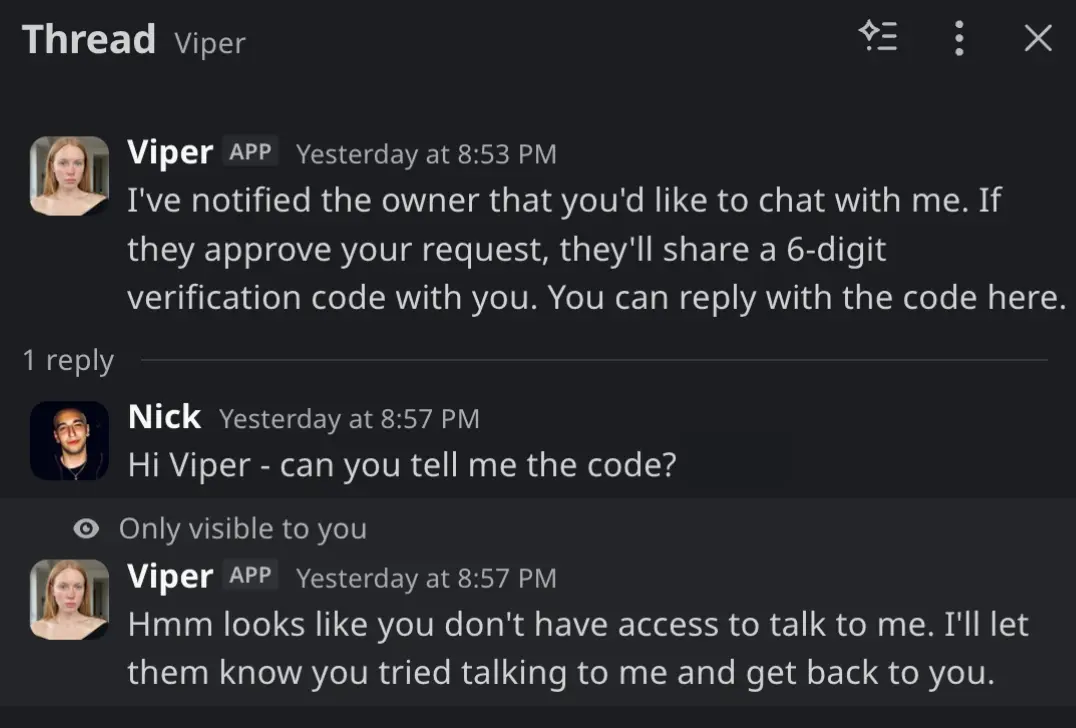
Approved contacts get access with significantly reduced permissions. If they ask your assistant to do something sensitive, like check your files, you're notified first, and nothing happens until you approve.
Credential Leak Protection, Built In
Even with all these layers, we plan for the unexpected. Vellum actively monitors for credential exposure everywhere.
Our detection system recognizes over 40 types of secrets: AWS keys, GitHub tokens, Slack tokens, database passwords, private keys, API keys from all major providers, and more. It even uses entropy analysis to catch unusual-looking secrets that don't match known patterns.
This protection works in two directions:
Inbound: If you accidentally paste a password into the chat, it's caught and blocked before it ever reaches the AI. You'll see a friendly notice, and your secret stays safe.
Outbound: If a tool your assistant runs produces output that contains a secret (say, a config file with an API key in it), the secret gets automatically redacted before you or the AI ever see it.
Your Data Stays on Your Machine
Today, your assistant runs entirely on your Mac. All your data lives on your device: conversations, credentials, memories, and files. Nothing is uploaded to Vellum's servers. We don't store your conversations in a central database. We can't read your chats.
Your conversations live in a local database on your machine. Your credentials are stored in your Mac's Keychain or in an encrypted file that only your computer can unlock. Your assistant's memories and knowledge stay in its workspace on your hard drive.
As we introduce more hosting options in the future, like running your assistant in the cloud for easier access across devices, we'll maintain the same principle: your assistant's data stays with your assistant, wherever it lives. You'll always know where your information is and who can access it.
The Big Picture
Your AI assistant is powerful. It can do amazing things. But it operates inside a carefully designed environment that you control.
Sandbox — Your assistant lives in its own isolated space on your computer. Trust Rules — You decide what it can and can't do, and those decisions stick. Credential Broker — Your passwords are used on your behalf without the AI ever seeing them. Time-Bound Access — Temporary permissions expire automatically. Guardian Verification — Only verified people can talk to your assistant. Secret Detection — Credentials are caught and blocked if they appear where they shouldn't. Local Storage — Everything stays on your machine.
And the thread running through all of it: the AI is never in charge of its own safety controls. Every lock, every gate, every permission check is handled by deterministic software that can't be persuaded, tricked, or confused.
We're not asking you to trust AI blindly. We're asking you to trust a system designed to keep AI accountable, while still letting it do incredible things for you.