
Environments
Overview
An environment determines where your assistant runs. When you hatch a new assistant, you choose an environment that controls the machine and infrastructure powering the assistant's runtime. The environment you select affects latency, resource limits, and how much control you have over the underlying infrastructure.
You can specify the environment during hatch using the --remote flag:
vellum hatch --remote <local | gcp | aws | custom>Architecture
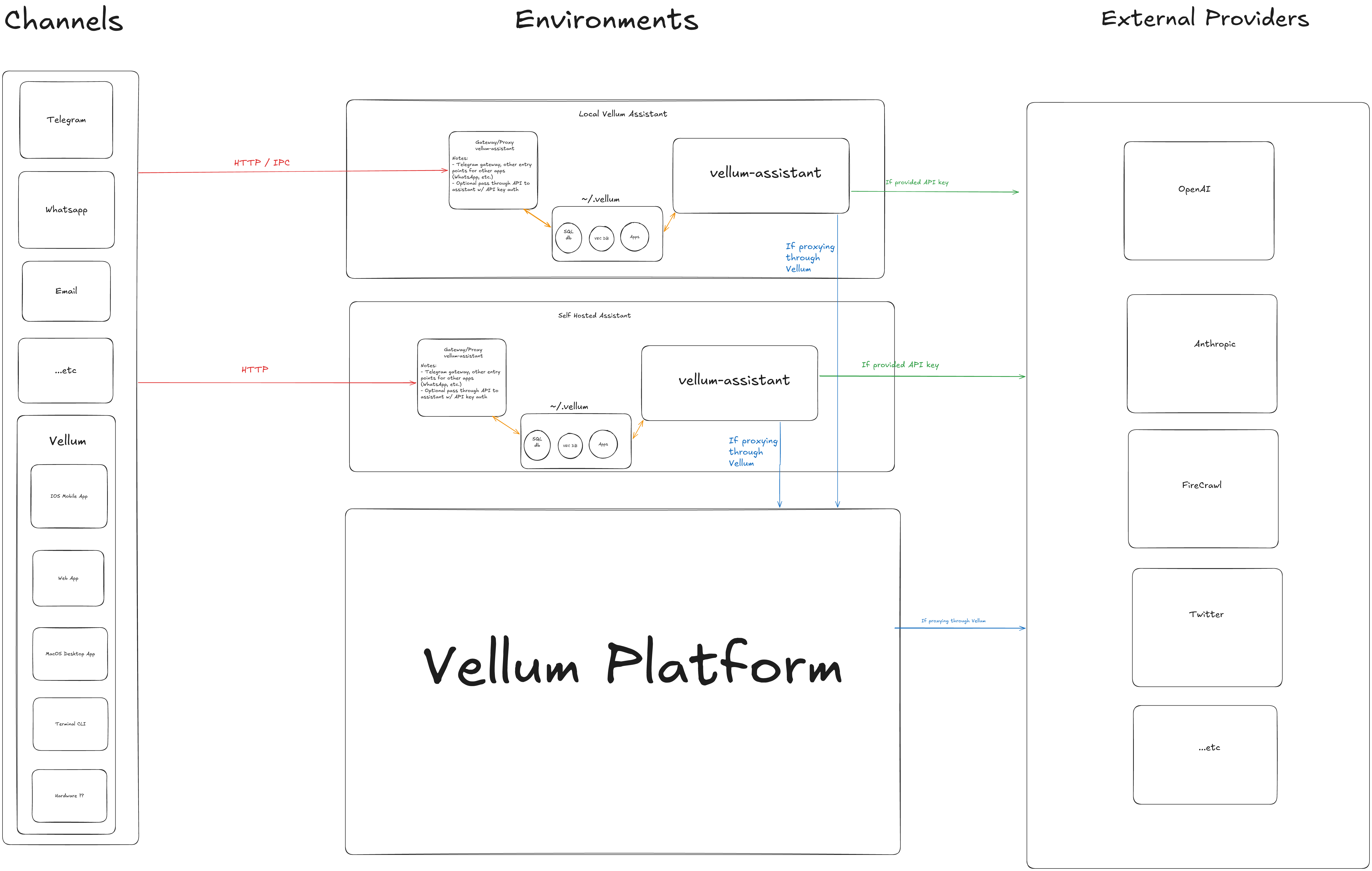
The following diagram shows how the different environments relate to channels and external providers:
Local
The default environment. The assistant runs on the same machine as the desktop app. This is the simplest way to get started — no cloud configuration is required.
vellum hatchWhen running locally, the assistant daemon and gateway both start on your machine. This is ideal for development, testing, and personal use where low latency and direct access to local resources matter.
- Pros
- Zero setup, low latency, full access to local files and tools.
- Cons
- Tied to your machine being on. Uses local compute resources.
User Hosted
Run the assistant on infrastructure you control. This is useful when you need the assistant to stay running independently of your local machine, or when you need more compute resources. Three hosting options are supported:
GCP
Provisions a Google Cloud Compute Engine VM and bootstraps the assistant runtime on it.
vellum hatch --remote gcpRequires gcloud authentication and the GCP_PROJECT and GCP_DEFAULT_ZONE environment variables.
AWS
Provisions an AWS EC2 instance and bootstraps the assistant runtime on it.
vellum hatch --remote awsRequires AWS credentials configured via the standard AWS CLI authentication flow.
Custom
Deploy the assistant to any machine you can SSH into. Set the VELLUM_CUSTOM_HOST environment variable to your target host.
VELLUM_CUSTOM_HOST=user@hostname vellum hatch --remote customThis option gives you full flexibility — use any Linux machine (on-premises, a VPS, or a VM from any cloud provider) as the assistant's runtime environment.
Vellum Hosted
Run your assistant on Vellum's managed platform. No cloud accounts or server management required — just hatch and go.
Vellum handles provisioning, upgrades, and infrastructure so you can focus on using your assistant. Managed assistants use Anthropic (Claude) as the default provider.
- Pros
- Zero setup, always-on, automatic upgrades, no infrastructure to manage.
- Cons
- No direct access to local files or tools on your machine. Provider selection is managed by Vellum.
Choosing an Environment
| Environment | Best For | Requires |
|---|---|---|
| Local | Personal use, development, testing | Nothing (default) |
| GCP | Always-on assistant, production workloads | GCP account, gcloud CLI |
| AWS | Always-on assistant, AWS-native teams | AWS account, AWS CLI |
| Custom | On-premises, custom infra, any SSH host | SSH access to target machine |
| Vellum Hosted | Zero-ops managed hosting | Vellum account |